
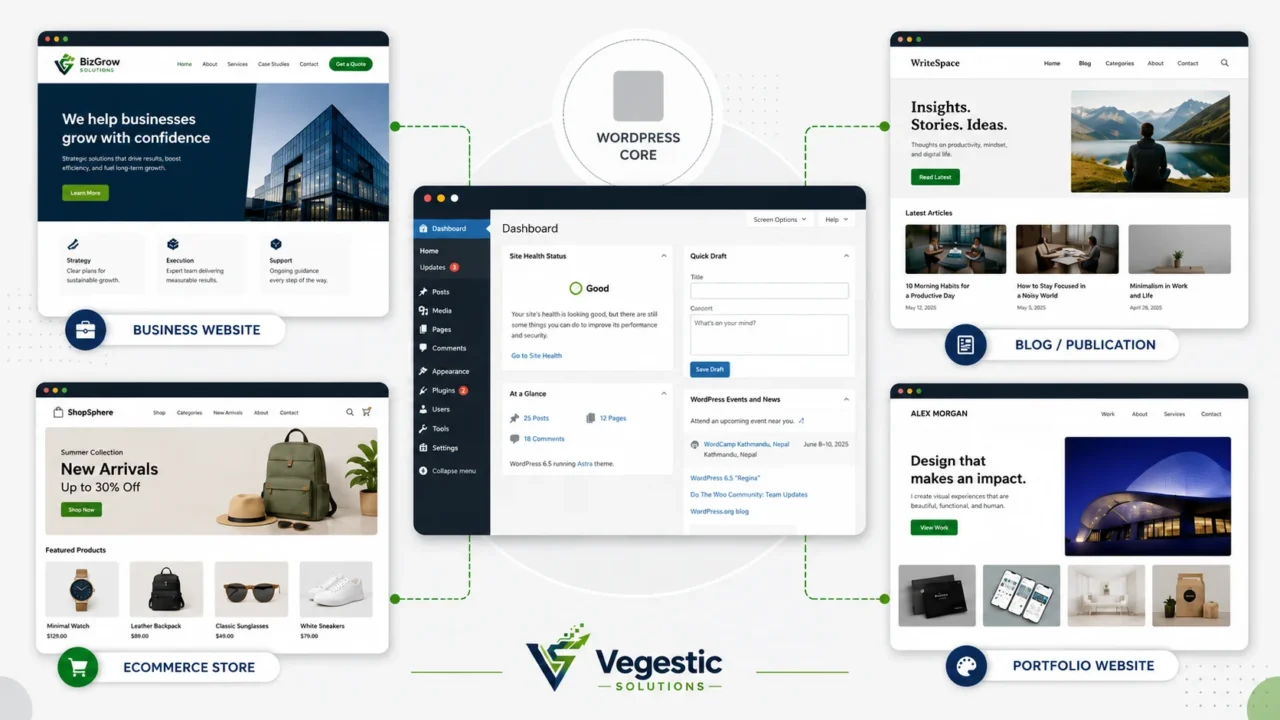
WordPress is an open-source content management system used to build and manage websites, including blogs, business websites, ecommerce stores, portfolios, publications, membership platforms, online courses, and directories. It gives you a dashboard for creating and organizing content, along with themes and plugins for design and added functionality. WordPress is a CMS, not a search engine: it powers sites that Google and other search engines then discover, crawl, and index. This guide explains what WordPress is used for, how it works, and whether it is the right fit for your next website.
Key takeaways
- WordPress is open-source content management software, not a website host and not a search engine.
- It can support a blog, a small-business site, an online store, a nonprofit, a membership community, an online course, or several of these at once.
- WordPress.org (self-hosted) and WordPress.com (managed hosting) both run on the same core software; they differ mainly in hosting, cost structure, and technical control.
- Routine publishing is beginner-friendly, while custom design, ecommerce, security, and performance work often benefit from professional support.
- Whether WordPress is a good fit depends on your content, budget, ownership requirements, and who will maintain the site after launch.
What is WordPress?
WordPress is open-source software. The code is free to use, modify, and distribute, and it is maintained by a global community of volunteer contributors and companies rather than a single vendor. According to W3Techs (accessed August 23, 2026), WordPress powers about 41 percent of all websites and nearly 59 percent of websites that use a known content management system, making it the most widely used CMS by a wide margin. You can download WordPress from WordPress.org, or use a managed version through WordPress.com.
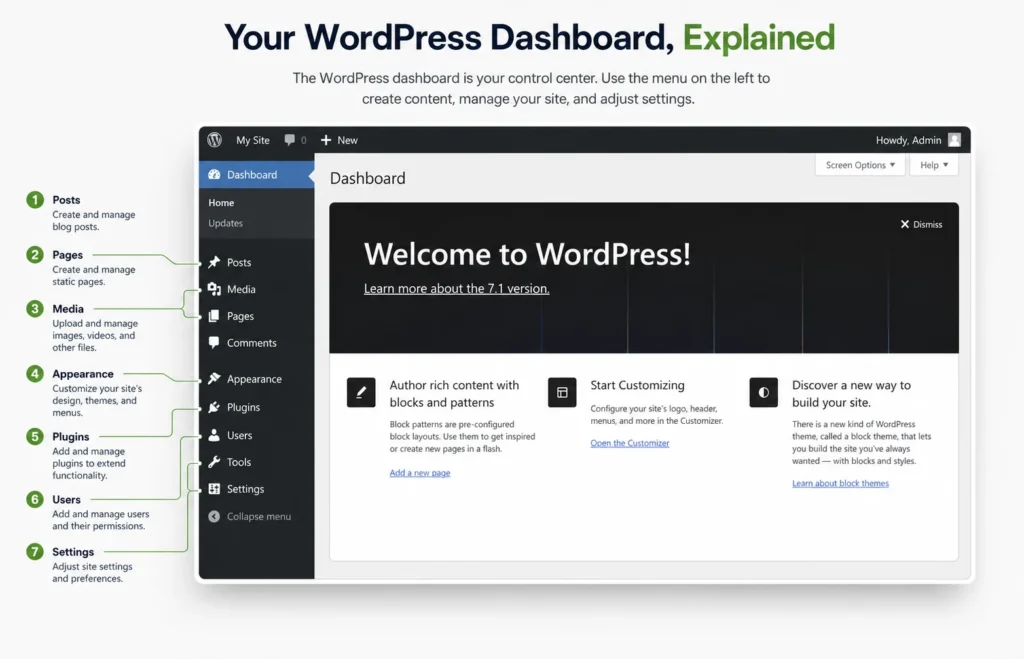
At its core, WordPress is content management software. Once installed, it gives you a WordPress dashboard, a private admin screen where you create pages and posts, upload images and video, manage users, and control how the site looks and behaves. Content is written and formatted using the block editor, which builds pages from individual content blocks (paragraphs, images, buttons, columns, embeds) rather than requiring you to write HTML by hand. WordPress.org’s own feature overview covers publishing tools, media management, and user roles in more detail.
Two other pieces complete the picture:
- Themes: control layout and visual design. Swapping a theme can change how a site looks without touching the content underneath.
- Plugins: add functionality, such as contact forms, SEO tools, booking calendars, or an online store through WooCommerce.
WordPress software itself is not a finished website. It needs a domain name (your web address) and web hosting (the server space where the site’s files and database live) before anyone can visit it. This is an important distinction: WordPress is the system you use to build and manage the site; hosting is where that site actually lives on the internet.
It also helps to separate WordPress from a fully hosted website builder. A hosted builder, the drag-and-drop, all-in-one type, usually bundles software, hosting, and support into one closed product with limited portability. Self-hosted WordPress separates those layers: you choose your own host, and you can move your site between hosting providers because you own the software, the theme, the plugins, and the content.
Is WordPress a CMS?
Yes, WordPress is a content management system (CMS). A CMS lets non-technical users create, organize, edit, schedule, and publish content through a visual dashboard, without manually coding each page. In WordPress, that means writing a blog post in the block editor, publishing a new service page, scheduling an announcement for next Tuesday, or updating a product description, all without touching a line of code.
Is WordPress a search engine?
No, WordPress is not a search engine. WordPress is the CMS that builds and manages a website; Google and Bing are search engines that crawl, index, and rank websites (including ones built with WordPress) across the internet. A WordPress site can also include its own internal search box, which only searches that site’s own content, not the wider web. Separately, SEO plugins help structure a WordPress site’s titles, metadata, and sitemaps so that outside search engines can understand and index the content more effectively. None of this makes WordPress itself a search engine.
What is WordPress used for?
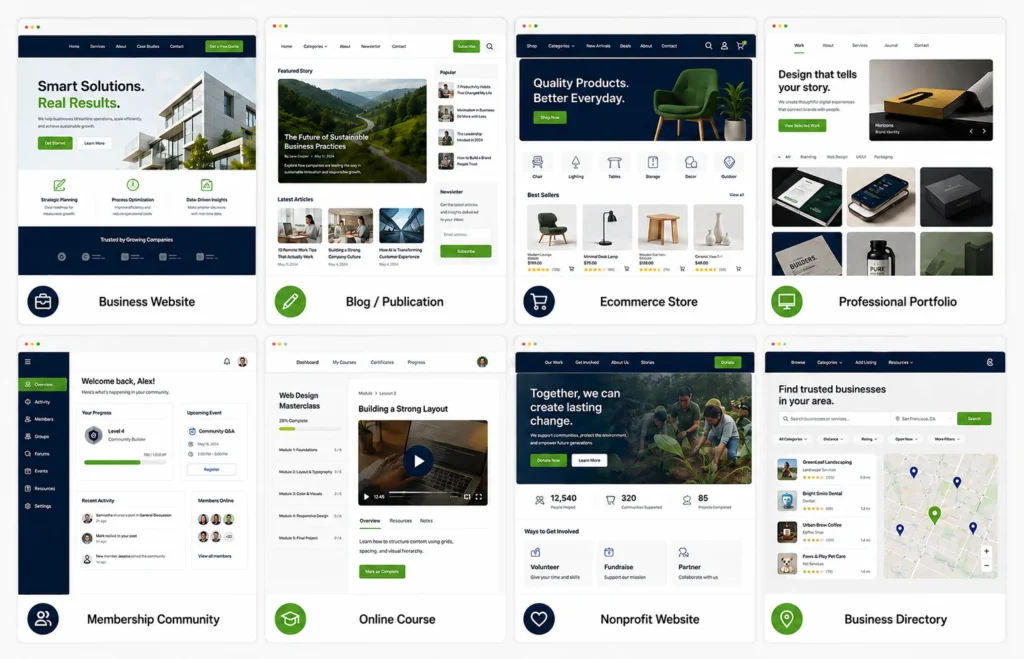
WordPress supports a wide range of website types because its core system (content, users, themes, plugins) can be extended for almost any publishing or business need. Some setups take an afternoon; others take a development team. Here is what WordPress is realistically used for, and what each use case actually requires.
Blogs and content websites: The original use case: regularly published articles, organized by category and tag, with comments and an RSS feed. Suits writers, publishers, and any business using content marketing. The block editor and built-in publishing tools (drafts, scheduling, revisions) support this directly. Limitation: a growing archive still needs a deliberate content structure, or older posts become hard to find.
Small-business and service websites: Service pages, an about page, a contact form, and clear calls to action. Suits local businesses, consultants, and agencies. Themes and page builders such as Elementor make this achievable without custom code. Limitation: a generic theme can look like every other small-business site unless it is customized around your actual offer.
Ecommerce stores using WooCommerce: A store with products, cart, checkout, and payment processing, built with the WooCommerce plugin on top of WordPress. Suits retailers and product-based businesses that want ownership of their storefront rather than renting one from a closed platform. Limitation: ecommerce adds real technical weight (inventory, tax, shipping, payment security), and it usually needs more careful hosting and maintenance than a brochure site.
Professional portfolios: Image or project galleries with case studies, suited to designers, photographers, agencies, and consultants who need to show work. Media management and portfolio-focused themes handle this well. Limitation: heavy, unoptimized images are the most common reason portfolio sites feel slow.
News and magazine websites: Multi-author publishing with categories, editorial workflow, and high content volume. Suits online publications and multi-writer teams. WordPress user roles (administrator, editor, author, contributor) support this exact workflow. Limitation: high-traffic publications need stronger hosting and caching than a typical small-business site.
Nonprofit and fundraising websites: Mission pages, donation forms, event listings, and volunteer sign-ups. Suits nonprofit organizations and community groups. Plugins add donation processing and event calendars on top of standard WordPress pages. Limitation: payment and data-handling plugins for donations need the same security attention as any ecommerce checkout.
Membership and community websites: Gated content, member accounts, and paid access tiers. Suits creators, associations, and businesses selling ongoing access rather than a one-time product. Dedicated membership plugins layer account and paywall logic on top of WordPress’s user system. Limitation: membership sites require ongoing content and account management, not just a one-time build.
Online courses: Structured lessons, quizzes, and student progress tracking, built with a learning management system (LMS) plugin on top of WordPress. Suits educators, coaches, and businesses productizing expertise. Limitation: course platforms need reliable video hosting and a clear plan for support and updates as content ages.
Directories and listing websites: Searchable listings of businesses, jobs, properties, or events, often with filters and submission forms. Suits marketplaces and local directories. Directory plugins extend WordPress’s post types to handle structured listings. Limitation: directory sites depend on data quality; an outdated or thin directory quickly loses user trust.
Booking and appointment websites: Calendars, time-slot selection, and confirmation emails for service businesses. Suits clinics, salons, consultants, and rental businesses. Booking plugins connect to WordPress pages and, often, to payment plugins for deposits. Limitation: time-zone handling and calendar sync are common sources of setup errors and deserve testing before launch.
Multilingual websites: Content published in more than one language, with language switchers and localized navigation. Suits businesses serving multiple regions or language communities. WordPress core supports translation into more than 70 languages, and dedicated multilingual plugins manage parallel content per language. Limitation: multilingual sites need an ongoing translation and content-update process, not just a one-time setup.
Headless or application-style implementations: WordPress used purely as a content backend, with a separate frontend (built in a framework such as React or Next.js) pulling content through the WordPress REST API. Suits technical teams that need WordPress’s editorial tools but a fully custom, app-like frontend. Limitation: this approach requires development resources well beyond typical theme and plugin setup, and it is a decision best made with a development team.
Not every one of these builds is easy, and none of them is realistically “one plugin away” from done. A store needs more than WooCommerce installed; a course site needs more than an LMS plugin activated. The plugin provides the mechanism; the site still needs planning, content, and testing.
Website type summary
| Website type | Typical user | Useful WordPress capability | Complexity | Main consideration |
|---|---|---|---|---|
| Blog / content site | Writers, publishers, content marketers | Block editor, categories, scheduling | Low | Needs a content structure as the archive grows |
| Small-business website | Local businesses, consultants, agencies | Themes, page builders, contact forms | Low to medium | Needs differentiation beyond the default theme |
| Ecommerce store | Retailers, product businesses | WooCommerce | Medium to high | Needs stronger hosting, security, and ongoing upkeep |
| Portfolio | Designers, photographers, freelancers | Media management, galleries | Low | Image optimization affects speed |
| News / magazine | Multi-author publications | User roles, editorial workflow | Medium to high | Traffic growth needs stronger hosting and caching |
| Nonprofit / fundraising | Nonprofits, community groups | Donation and event plugins | Medium | Payment and data handling need careful security |
| Membership / community | Creators, associations | Membership and paywall plugins | Medium to high | Ongoing content and account management required |
| Online course | Educators, coaches | LMS plugins | Medium to high | Video hosting and student-support planning needed |
| Directory / listings | Marketplaces, local directories | Directory and listing plugins | Medium | Depends heavily on data quality and upkeep |
| Booking / appointments | Clinics, salons, service businesses | Booking and calendar plugins | Medium | Time zone and calendar sync need testing |
How does WordPress work?
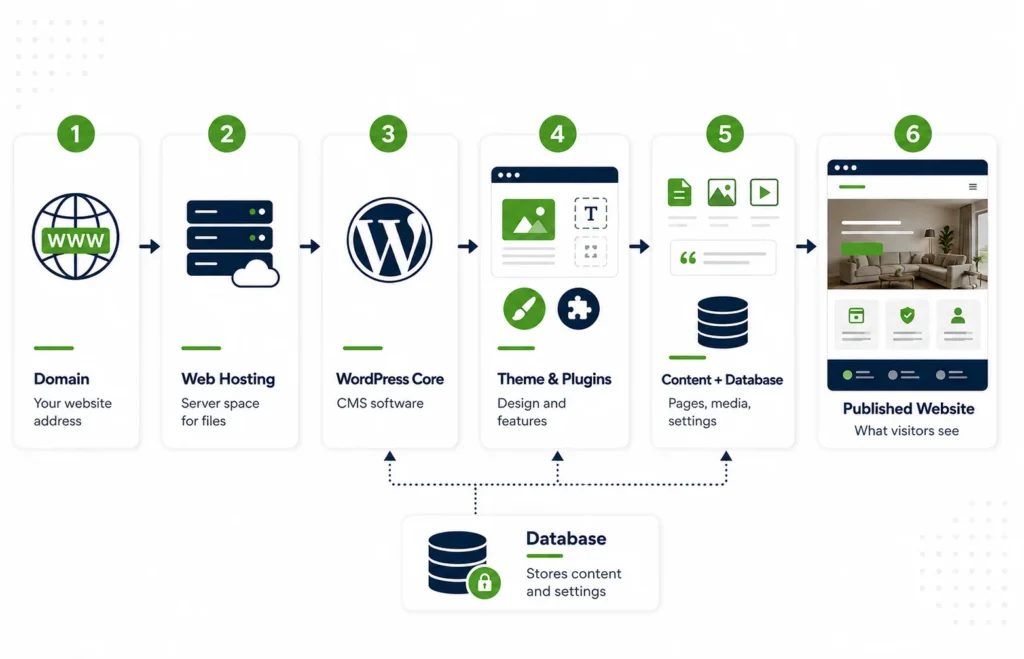
A working WordPress website is a stack of connected parts, not one single thing.
- Domain name: your address on the web (for example, yourbusiness.com).
- Web hosting: the server space where your site’s files and database actually live.
- WordPress core: the software itself, which handles content, users, and structure.
- Database: where your content, settings, and user data are stored.
- Theme: controls layout and visual design.
- Plugins: add specific functionality on top of the core software.
- Dashboard: the admin screen where you manage all of the above.
- The website visitors see: the public-facing pages generated from your content, theme, and active plugins.
In practice, setting up a site follows a similar sequence for almost every project:
- Select a domain and hosting arrangement.
- Install or create the WordPress website.
- Select or develop the design system.
- Add pages, content, and required functionality.
- Test, publish, maintain, and improve the website.
The first two or three steps can be genuinely simple: many hosts offer one-click WordPress installation, and thousands of ready-made themes exist for common site types. Where WordPress projects tend to need professional support is later in that list: information architecture for a large site, accessibility, security hardening, ecommerce configuration, performance tuning, and integrations with other business systems (CRM, email marketing, payment processors). These are solvable problems, but they are not one-click problems.
WordPress.com vs. WordPress.org
Both WordPress.com and WordPress.org run on the same WordPress software. The real difference is hosting and who is responsible for it. WordPress.com provides managed hosting bundled into paid plans; WordPress.org is the free, downloadable software that you install with a hosting provider of your own choosing, commonly called self-hosting. Details below reflect WordPress.com’s official comparison guide, last reviewed August 11, 2026.
| Category | WordPress.com | WordPress.org / self-hosted | Why it matters |
|---|---|---|---|
| Hosting | Managed hosting included on every plan | You choose and pay for your own host | Determines who is responsible when something breaks |
| Initial setup | Sign up, pick a plan, start building | Install WordPress on your chosen host yourself | Self-hosting has more setup steps but more choice |
| Maintenance | Core updates and security handled for you | You, or your developer, manage updates | Affects ongoing time commitment |
| Backups | Included on paid plans | Your responsibility, via host or plugin | Missing backups are a common self-hosted risk |
| Security | Managed and monitored as part of hosting | Depends on your host, theme, and plugin choices | Self-hosted sites carry more direct responsibility |
| Themes | Curated library; custom themes on eligible plans | Any free or premium theme, or a custom build | Self-hosting offers more design freedom |
| Plugins | Installable on any paid plan (Personal and above) | Full access to the WordPress.org plugin directory and third-party plugins | Both support plugins; self-hosting has the widest selection |
| Custom development | Limited on lower plans; more room on higher tiers | Full custom code and server-level access | Matters for complex or highly specific builds |
| Monetization | Available on paid plans, with some built-in options | Full flexibility from day one | Relevant for ad-supported or affiliate-driven sites |
| Technical control | Simplified, less server-level access | Full control over hosting, server, and configuration | Matters for developers and complex integrations |
| Support | WordPress.com support included, 24/7 on paid plans | Community forums; no dedicated vendor support | Affects how you get help when something goes wrong |
| Cost considerations | Predictable plan pricing, hosting included | Separate hosting, domain, and often premium plugin or theme costs | Total cost depends on how the pieces are assembled |
| Best-fit user | Beginners and teams wanting less technical overhead | Businesses needing full control or custom development | Helps match the platform to your actual needs |
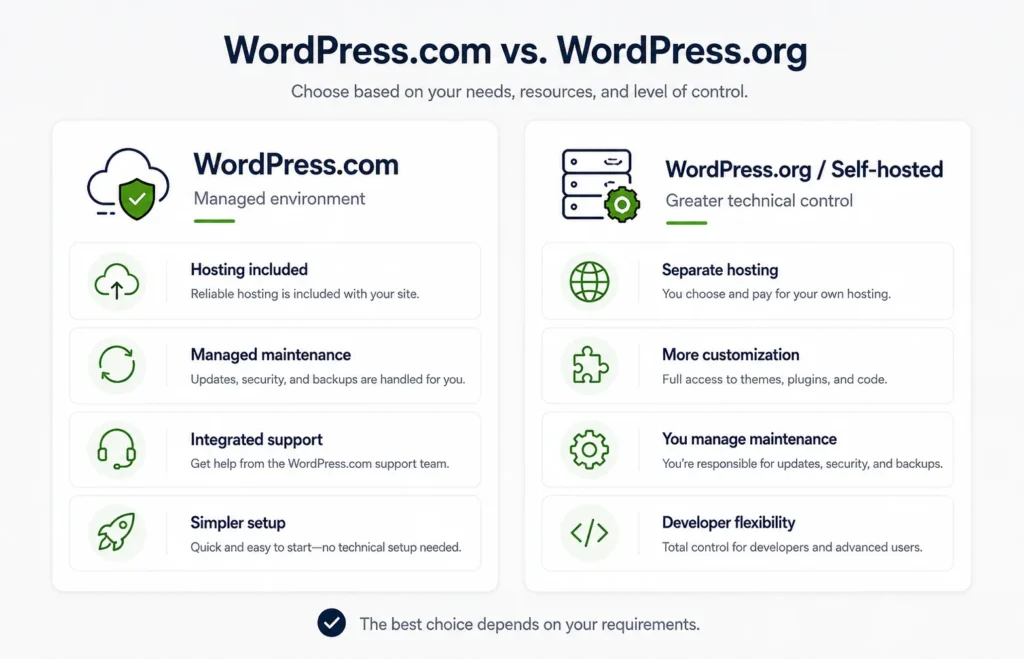
As a starting point: beginners who want less maintenance responsibility are often better served by WordPress.com’s managed plans. Businesses that expect extensive customization, or a specific integration with internal systems, tend to outgrow a managed plan’s limits and benefit from self-hosted WordPress.org instead. Ecommerce businesses usually need the fuller plugin and server access that self-hosting provides, particularly as a catalog grows. Developer-led projects, where a team wants full control over code, hosting, and infrastructure, are almost always built on self-hosted WordPress.org.
Why use WordPress?
Why use WordPress rather than another platform? For many businesses, the answer comes down to ownership and flexibility rather than any single standout feature.
Content ownership and control: Your content, theme, and plugin choices belong to you. You can move your site to a different host without losing your content or rebuilding from scratch, which is not always true of closed, all-in-one platforms.
Flexible publishing: From a single blog post to a multi-author news operation, WordPress’s publishing tools (drafts, scheduling, revisions, password-protected posts) scale from a solo creator to an editorial team.
Themes and plugins: A large ecosystem of free and premium themes and plugins means most common features (forms, SEO tools, galleries, bookings, ecommerce) can be added without building them from scratch.
Custom-development potential: When off-the-shelf plugins are not enough, WordPress supports custom WordPress development: a developer can build bespoke functionality, custom post types, or integrations specific to your business.
Ecommerce through WooCommerce: WooCommerce turns a WordPress site into a full online store, with product catalogs, checkout, and payment processing, while keeping the store on infrastructure you control.
User roles and editorial workflows: Built-in roles (administrator, editor, author, contributor, subscriber) let a marketing manager, a content team, and a developer share one site without stepping on each other’s work.
Integration options: WordPress connects to CRMs, email marketing tools, analytics platforms, and payment processors, either through plugins or custom development, so the website is not separate from the rest of the business.
SEO foundations: WordPress does not rank a site by itself. What it provides is a structure (clean URLs, headings, metadata fields, sitemaps) that supports good SEO practices. Actual search performance still depends on content quality, technical implementation, page speed, accessibility, the site’s overall authority, competition in your market, and the links pointing to your pages. Google’s own search essentials guidance covers these factors in more depth. WordPress makes the foundations easier to implement; it does not replace them.
Ability to support simple and complex sites: The same core software runs a five-page brochure site and a large membership platform. You are not forced onto a different product as your needs grow.
Community and documentation: A large, active community means themes, plugins, and troubleshooting help are widely available, alongside official documentation from WordPress.org and Learn WordPress.
Portability and long-term flexibility: Because self-hosted WordPress separates software, hosting, and content, you retain the option to change hosts, developers, or agencies later without starting over.
What are the positive aspects of WordPress?
So, is WordPress good? For most business, publishing, and content-driven websites, the honest answer is yes, provided you understand what running it actually involves. The positive aspects of WordPress are less about any one standout feature and more about the practical, day-to-day advantages for the people who have to manage a website after it launches.
| Positive aspect | Practical business benefit | Important condition |
|---|---|---|
| Open-source and free core software | No license fee for the CMS itself, lowering the cost of entry | Hosting, premium themes, plugins, and development time still cost money |
| Non-technical content editing | Marketing and content staff can publish without a developer for every change | Larger structural changes may still need technical help |
| Large plugin ecosystem | Most common features can be added without custom code | Plugin quality varies, and each one adds a maintenance responsibility |
| Ownership and portability | You can move hosts or developers without losing your site | Requires proper backups and a documented setup to move smoothly |
| Scales from simple to complex | One platform can support a blog today and a store tomorrow | Complexity should be added deliberately, not accumulated by accident |
| Strong documentation and community | Troubleshooting help and learning resources are widely available | Community answers vary in quality; official docs are the safer reference |
| WooCommerce ecommerce path | A credible, self-owned online store without switching platforms | Ecommerce still needs proper security and performance planning |
| Editorial and user-role structure | Multiple people can manage content with appropriate access levels | Roles need to be assigned deliberately, not left at default settings |
What are the limitations of WordPress?
WordPress’s flexibility comes with responsibilities that a closed, all-in-one platform would otherwise handle for you. None of these are reasons to avoid WordPress outright; they are things to plan for.
Updates: WordPress core, themes, and plugins release updates regularly. Skipping them for long periods increases the chance of compatibility issues or security gaps.
Backups: On self-hosted WordPress, backups are your responsibility, or your host’s, if included in your plan, rather than something WordPress handles automatically.
Security responsibilities: Self-hosted sites need reasonable security practices (strong passwords, limited login attempts, a reputable host, timely updates). This is manageable, but it is not automatic.
Plugin and theme quality: Not every plugin or theme in the ecosystem is well maintained. Choosing established, actively updated options reduces risk.
Compatibility conflicts: Plugins occasionally conflict with each other or with a theme, particularly after an update. Testing changes on a staging site before pushing them live reduces this risk.
Performance optimization: A default WordPress installation is not automatically fast. Image sizes, caching, hosting quality, and plugin count all affect real-world speed.
Hosting quality: WordPress runs differently on a budget shared host than on a well-configured managed host. Hosting choice has a real, measurable effect on speed and reliability.
Learning curve: Publishing content is approachable for most people quickly. Site structure, custom design, and technical configuration have a steeper learning curve.
Premium plugin and development costs: Free plugins cover a lot, but premium plugins, custom themes, and developer time are real costs to budget for on anything beyond a simple site.
Accessibility responsibilities: WordPress themes vary in how accessible they are by default. Meeting accessibility standards for a business site is a deliberate effort, not an automatic outcome of using WordPress.
Custom development: Highly specific functionality still requires a developer. WordPress reduces how much you need to build from scratch; it does not eliminate development work for complex requirements.
Overcomplicated plugin stacks: It is easy to accumulate plugins over time until the site becomes harder to maintain than it needs to be. Fewer, well-chosen plugins are usually better than many overlapping ones.
Testing before updates: Applying updates directly to a live site without testing is a common source of avoidable problems, especially for ecommerce or membership sites with many moving parts.
Is WordPress easy to use?
Is WordPress easy to use? Yes, for routine publishing tasks. Writing a post, uploading an image, or editing existing text is approachable for most people within a short time. Custom layouts, ecommerce configuration, security hardening, performance work, and custom functionality require more experience, and often benefit from professional help.
| Task | Beginner difficulty | What may be required |
|---|---|---|
| Publishing a page | Easy | Basic familiarity with the block editor |
| Uploading an image | Easy | None beyond the dashboard’s media library |
| Editing text | Easy | Comfort with the block editor’s formatting tools |
| Creating navigation | Moderate | Understanding of the site’s menu settings |
| Changing a theme | Moderate | Awareness that layout and some content placement may shift |
| Installing a plugin | Moderate | Judgment about plugin quality and compatibility |
| Editing advanced layouts | Moderate to hard | Page builder experience or developer support |
| Configuring ecommerce | Hard | WooCommerce setup, payment, tax, and shipping knowledge |
| Improving performance | Hard | Caching, image optimization, and hosting-level knowledge |
| Creating custom functionality | Hard | Developer involvement or custom plugin development |
Is WordPress a good website builder?
Why WordPress, and not another platform, for this particular project? Is WordPress a good website builder for your project specifically? The honest answer depends on your content, functionality needs, budget, ownership requirements, available maintenance resources, and where the site needs to go in the future. There is no single right answer for every business.
| Requirement | WordPress fit | Why | Main caveat |
|---|---|---|---|
| Local service business | Strong fit | Themes and page builders cover typical service-site needs | Still needs clear, differentiated content, not just a template |
| Content-heavy business website | Strong fit | Publishing tools and content structure are core strengths | Needs an information architecture plan as pages grow |
| Blog or publication | Strong fit | Built for exactly this use case from the start | High-traffic sites need stronger hosting and caching |
| Portfolio | Strong fit | Media management and gallery-focused themes work well | Image optimization matters for load speed |
| Nonprofit | Strong fit | Donation and event plugins extend standard pages | Payment and data plugins need careful security review |
| Ecommerce store | Possible fit | WooCommerce is capable and widely used | Needs stronger hosting, security, and ongoing upkeep than a brochure site |
| Membership website | Possible fit | Membership plugins add accounts and paywalls | Requires ongoing content and account management |
| Online course | Possible fit | LMS plugins support structured lessons and quizzes | Needs a plan for video hosting and student support |
| Simple one-page website | Possible fit | Achievable, but may be more setup than necessary | A lightweight, purpose-built page tool may be faster |
| Business wanting no maintenance responsibility | Possible fit | WordPress.com managed plans reduce this burden | Self-hosted WordPress does not remove maintenance responsibility |
| Highly specialized SaaS product | Consider alternatives | WordPress is a CMS, not an application framework | A dedicated application stack usually fits SaaS products better |
| Complex real-time web application | Consider alternatives | Real-time, highly interactive apps exceed typical CMS use | This is an application-development project, not primarily a website-building one |
A real WordPress project from Vegestic IT Solutions
Case examples are more useful than generic claims, so here is one from Vegestic’s own delivery work.
Vegestic IT Solutions delivered a responsive WordPress service website project for Pak Central Heating System, a business offering heating, boiler, radiator, and HVAC services to residential and commercial customers. The project needed to explain several distinct technical service categories, central heating, VRF and HVAC, steam boilers, maintenance, radiators, and industrial fittings, without requiring visitors to understand the equipment before asking for help.
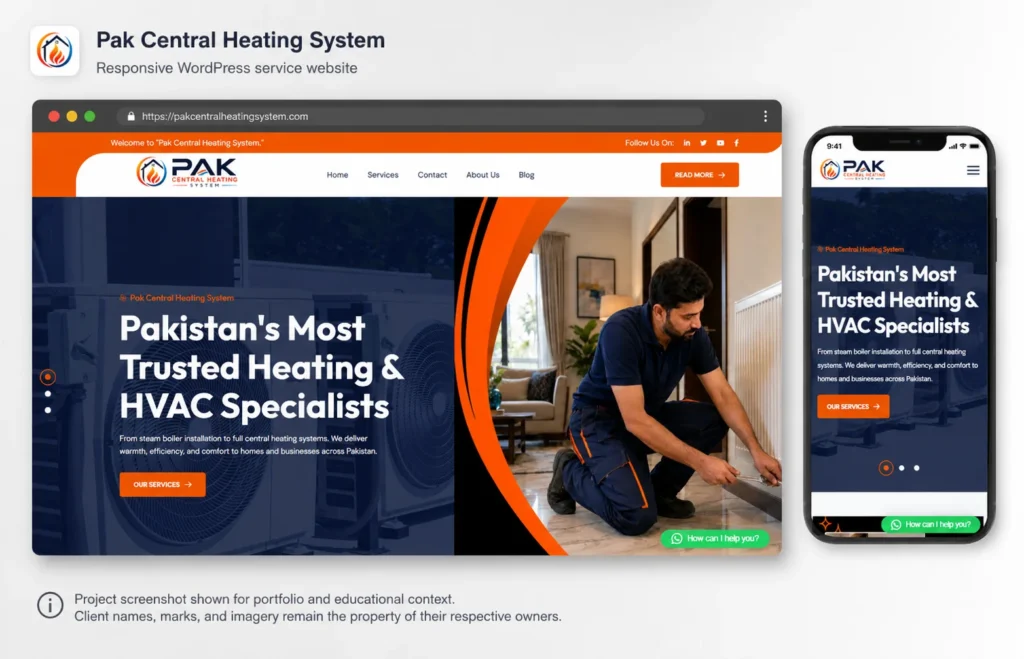
Vegestic’s role on this project was web development. The build was completed within the supplied 15 to 20 April 2026 delivery window, using WordPress with an established WordPress theme and Elementor for page construction. That combination supported the project’s short timeline while still delivering editable service templates, clear enquiry routes, a service-led information architecture, and responsive page construction across devices.
WordPress was an appropriate choice here for straightforward reasons. The business needed a content-managed site that a non-technical owner could update over time, organized around clearly defined service categories rather than a single generic “services” page, with dependable paths from browsing to contacting the business. WordPress and Elementor supported that structure without requiring custom software development, which matched the project’s scope and timeline. The intended outcome was a credible digital destination where visitors could understand the service range and move toward a consultation. This case does not claim specific traffic, lead, or ranking results; those depend on many factors beyond the website itself.
If your business has a similar need, comparable service categories, a non-technical team, and a website that needs to be genuinely easy to update, Vegestic’s web development services cover this type of WordPress project from planning through launch.
Choose WordPress when…
WordPress is worth considering when
- You need a content-managed site that non-developers can update after launch.
- Your project fits recognizable categories: business site, blog, publication, portfolio, nonprofit, membership site, or online store.
- You want to own your content and retain the option to change hosts or developers later.
- You expect the site to grow in complexity over time, rather than stay static.
- You have, or plan to have, some ongoing capacity, internal or outsourced, for updates and maintenance.
Consider another approach when
- You want the absolute minimum setup and maintenance responsibility for a very simple site; a hosted website builder may be faster to launch.
- Your business is fundamentally an ecommerce operation with complex logistics; a dedicated ecommerce platform may fit better out of the box.
- You are building a SaaS product or an application with accounts, real-time features, or complex business logic; that is an application-development project, not primarily a content-managed website.
- You have no internal or outsourced capacity for any ongoing maintenance and want that responsibility fully removed; a fully managed, closed platform may suit you better than even a managed WordPress plan.
Questions to answer before choosing
- What is the website’s main goal, and who is it for?
- How often will you publish or update content?
- Do you need full ownership of your content and code, or is a managed, less flexible platform acceptable?
- Do you need to sell products or services directly through the site?
- What other systems (CRM, email, payments, analytics) need to connect to it?
- Who will be responsible for day-to-day editing after launch?
- Who will be responsible for maintenance, updates, and backups?
- Who will be responsible for security?
- What is your realistic budget, including hosting, themes, plugins, and any development time?
- Will you self-host or use managed hosting?
- How much custom functionality or design do you expect to need, now and later?
- Does your team, internal or agency, have the expertise the chosen approach requires?
Most businesses evaluating a content-managed website, a business site, a blog, a store, a nonprofit, or a membership platform, will find WordPress a reasonable starting point to evaluate seriously. Highly specialized applications and businesses that want zero ongoing responsibility are the clearest exceptions.
Final verdict: Is WordPress right for your project?
WordPress is used to build and manage content-driven websites: blogs, business sites, online stores, portfolios, nonprofits, membership platforms, and online courses. Its strongest use cases are content-heavy or publishing-oriented sites where non-technical teams need to manage their own updates. Its main tradeoffs are the maintenance, security, and technical decisions that come with an open, flexible system rather than a fully closed one. Businesses that value ownership, flexibility, and room to grow should evaluate it seriously. Before choosing any platform, map your specific content, functionality, budget, and maintenance capacity against what that platform actually requires. If you would like a second opinion on whether WordPress fits your project, you can Discuss a WordPress project with Vegestic’s team.
Frequently asked Questions (FAQ's)
What is WordPress mainly used for?
WordPress is mainly used to build and manage content-driven websites: blogs, business websites, online stores, portfolios, publications, nonprofit and membership sites, and online courses. It provides a dashboard for creating and organizing content, plus themes and plugins for design and added functionality. The specific mix of features you use depends on your project, but content management is the core function in every case.
Is WordPress a CMS?
Yes, WordPress is a content management system. It lets you create, organize, edit, schedule, and publish content through a dashboard, without manually coding each page. This is what separates WordPress from a static, hand-coded website, where every change requires editing code directly.
Is WordPress a search engine?
No, WordPress is not a search engine. It is the software that builds and manages a website. Google and Bing are separate search engines that crawl and index websites, including WordPress sites, from across the internet. A WordPress site can include its own internal search box, which only searches that site's content, not the wider web.
Is WordPress free?
The core WordPress software from WordPress.org is free to download and use. However, a working website still needs a domain name and web hosting, both of which have ongoing costs. WordPress.com offers a free plan with limitations, alongside paid plans that add managed hosting and more features.
Is WordPress good for a small business?
Is WordPress good for a small business? For most small businesses that need a content-managed website with pages, a blog, and a contact or booking flow, yes. Themes and plugins cover common small-business needs without custom development. The main requirement is planning for basic ongoing maintenance, whether handled internally or through a hosting provider or agency.
Is WordPress good for ecommerce?
WordPress can support ecommerce through the WooCommerce plugin, which adds a product catalog, cart, and checkout to a WordPress site. It suits businesses that want to own their storefront rather than rent it from a closed platform. Ecommerce sites need stronger hosting, security, and ongoing maintenance than a typical brochure site, so this is worth planning for before launch.
Is WordPress easy to use for beginners?
Routine tasks, publishing a page, editing text, uploading an image, are approachable for beginners fairly quickly using the block editor. Site structure, custom layouts, ecommerce setup, and performance work involve a steeper learning curve. Many small businesses handle day-to-day publishing themselves while using a developer for the initial build and occasional technical work.
Can WordPress be used without coding?
Yes, for most day-to-day content tasks. The block editor, themes, and plugins let you publish content, change layouts, and add common functionality without writing code. Custom functionality or a fully bespoke design still typically requires a developer, even though most ongoing site management does not.
What is the difference between WordPress.com and WordPress.org?
Both use the same WordPress software; the difference is hosting and responsibility. WordPress.com includes managed hosting on its paid plans, handling updates, security, and backups for you. WordPress.org is the free software you install yourself with a hosting provider of your choice, giving you more control but more responsibility for maintenance and security.
Why use WordPress instead of another website builder?
Why use WordPress instead of another website builder often comes down to ownership and long-term flexibility. Self-hosted WordPress lets you keep and move your content, choose your own hosting, and add custom functionality as your needs grow, rather than being limited to one vendor's closed system. Hosted builders can be simpler to start with, but typically offer less portability and less room for customization later.
Is WordPress good for SEO?
WordPress provides a solid technical foundation for SEO: clean URLs, heading structure, metadata fields, and sitemap support, often extended with an SEO plugin. It does not automatically produce search rankings. Performance also depends on content quality, page speed, accessibility, competition, and the links pointing to your site, so WordPress is a foundation to build on, not a shortcut past those factors.
Can WordPress support a custom website?
Yes. Beyond themes and plugins, WordPress supports custom WordPress development, including custom page templates, custom functionality, and even headless setups where WordPress manages content behind a separately built frontend. This makes it viable for both a simple small-business site and a more complex, custom-built project, depending on the development resources available.
Last updated September 1, 2026